

| T:Title M:6/8 L:1/8 K:D |
Title: Title is pretty straightforward. Just type it in!
When the title includes an initial article, it may be moved to the end of the title, following a comma to facilitate alphabetization.
T:The Road to Lisdoonvarna
or
T:Road to Lisdoonvarna, The
will display as:
The Road to Lisdoonvarna
However, some conversion programs will move any words preceding a comma to the end of the title:
T:Sunrise, Sunset
will display as:
Sunset, Sunrise
Using a back slash will resolve this problem:
T:Sunrise,\ Sunset
The title field is repeatable, which is helpful when a tune has more than one name. The first use of the field will generate the title as usual; the second will generate the alternative title in smaller print.
Meter: is entered
as a fraction: 6/8 3/4 2/2 2/4 4/4
or in letter form: C C| (cut time)
Length: the default note length is set automatically by the meter field, but it can be changed. Generally speaking, chose the note length that
occurs most frequently in the tune being transcribed:
1/2 = half note
1/4 = quarter note
1/8 = eighth note
1/16 = sixteenth note
Key: use upper case letter to indicate key. To indicate mode:
| upper case letter alone indicates that key
in major: upper case letter followed by lower case "m" indicates minor: upper case letter followed by "mix" indicates mixolydian mode: upper case letter followed by "dor" indicates dorian mode: |
A Am or Amin Amix Ador |
= A major = A minor = A mixolydian = A dorian |
Other header elements are optional:
Other fields, such as historical notes, rhythm, source, etc., are optional.
C:Composer
D:discography
H:history
N:Notes
O:origin
P:parts (used in the header to indicate the order in which the parts of the
tune are played; e.g., P:ABAC, P:A, P:B)
Q:tempo (e.g., Q:200, Q:C2=200)
R:rhythm (e.g., R:R, R:reel)
S:source (e.g., S:collected in Brittany)
Z:transcription note
____________________________________________________
The Body
notes | note lengths | accidentals |
bar lines, etc. | multiple
staves | formatting | fonts
Notes are entered using letters (thus the name
"ABC notation"). The pitch is determined by the letter itself and the octave
by case and punctuation.
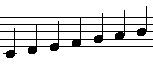
Notes below middle C are upper case followed by a comma (G, A, B,)
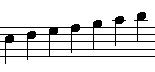
Notes between middle C to the next B (3rd line of the staff) are upper case
(C D E F G A B)
Notes from C in 3rd space of the staff to the next B (2nd space above the
staff) are lower case (c d e f g a b)
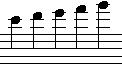
Notes from C in 2nd line above the staff to the next B are lower case followed
by an apostrophe (c' d' e' f' g')
| G, A, B, | |
C D E F G A B | |
| c d e f g a b | |
c' d' e' f' g' | |
| Put together: | |
||
____________________________________________________
Bar lines, section ends, etc., are entered using
a combination of the | and ] keys, using the colon to indicate repeats.
| | |] || [| :| |: :: will display as: | 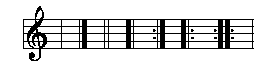 |
____________________________________________________
Rests use the letter "z" followed by a number to indicate length.
This coding:
X:1
T:Rests
M:C
L:1/4
K:C
z4|z2z2|zzzz|
generates this:
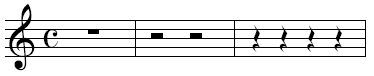
It is possible to make the rest invisible by using "x" instead 'f "z".
This coding:
X:1
T:Invisible Rests Using X
M:C
L:1/4
K:C
z4|x4|z4|x4|z4|x4|
generates this:

____________________________________________________
More advanced coding (do not attempt this at home until you feel
proficient in ABC):
Multiple staves (see also
voices)
For a two-staff work, precede each line with the voice number, e.g., [V:1], [V:2]:
| X:1 T:Bottom of the Punchbowl C:harmony by M. Koth M:C| L:1/8 K:D [V:1]|:FE|"D"D2A2d3c|d2A2 FGAF|"Em"E2 e2 efgf|"A"edcB AGFE| [V:2]|:FE|D2F2A3e|f2d2 AGFA|B2e2 gfef|gfed cBAG| [V:1]"D"D2 A2 d3 (e|fe)dc d3 (A|"G"Bc)d(B "A"AB)AG|"D"F2 D2 D2:| [V:2]A2d2 f3 (e|fg)fe f3 (A|dc)B(d ed)cB|A2F2D2:| |
____________________________________________________
Advanced coding:
Format the music and page:
These "pseudocomments" are used to fine tune the page layout for creating a PDF.
%%topmargin
%%botmargin
%%landscape = landscape, rather than portrait, orientation
%%staffwidth = width of staff
%%indent = amount to indent the first staff (done at the start of the piece and after a T: field)
%%titlespace = vertical space before the title
%%gchordspace = space between staff and guitar chords
%%scale = size of musical symbols
%%staffsep = space between staves
%%sysstaffsep = separation between staves within one system in multi stave music
%%systemsep = separation between systems in multi stave music
%%stretchstaff = stretches underfull staves across page
%%stretchlast = stretches last staff if underfull
%%newpage = forces a new page
Examples:
%%topmargin .5cm
%%botmargin .5cm
%%staffwidth 7.0in
%%stretchlast
%%titlespace .25cm
%%partsspace .1cm
%%scale .75
%%staffsep 35pt
%%sysstaffsep 35pt
%%systemsep 35pt
Fonts
A list of postscript fonts that work with ABC is found here.
The font may be specified in the following areas:
%%titlefont (T:)
%%subtitlefont (T:)
%%composerfont (C:)
%%partsfont (P:) a box can be put around the name of the part "box"
%%tempofont (Q:)
%%vocalfont (w: ) = for lyrics or vocals under a staff
%%gchordfont for the guitar chords
%%textfont = for any text (use the pseudocomment %%text)
%%wordsfont (W: ) = for words under the tune
%%voicefont (V: ) = for voice names in multiple staves
%%barnumberfont
%%barlabelfont
%%indexfont
Examples:
%%titlefont Helvetica-Italic 12
%%subtitlefont Helvetica-Bold 14
%%gchordfont Helvetica-Bold 16
%%textfont Helvetica-Italic 10
%%partsfont Helvetica-Bold 14 box
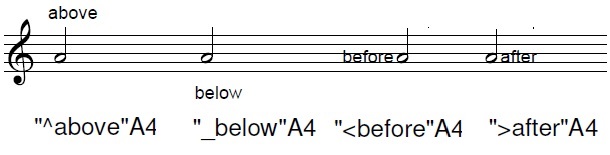
Adding text annotations above or below the staff or preceding or following a note, rest, or bar line:
^ will place the text above the note, rest, or bar line
_ [underscore] will place the text below note, rest, or bar line
"^[text]" puts text immediately above the note, above the staff
"_[text]" puts text immediately below the note, below the staff
"<[text]" puts text immediately before the note, in the space line or space as the note
">[text]" puts text immediately after the note, in the space line or space as the note
____________________________________________________
Displaying and printing music from ABC
notation
To convert ABC coding into printable staff notation, go to one of these websites:
ABC entry and conversion
Michael Eskin's ABC transcription tools
ABC player and editor (no pdf generator but you can start the midi from a specific note)
ABC converter (from Colin Hume; can generate a PDF when you click on the print button)
Jens Wollschläger's ABC transposer (does not display or print a tune, but the ABC coding will be transposed; chords in quotation marks will also be changed, including their case and may need to be changed back to upper case)
____________________________________________________
ABC documentation and tutorials
ABC quick reference card (PDF, 2 pages)
abctab2ps user's guide: internet archive version or 2011 PDF version
Peter Yarensky's abc 2.2 Help File
abc:standard:v2.0
ABC documents by John Chambers:
An introduction to ABC music notation
An ABC primer
How to interpret ABC music notation by Steve Mansfield
List of ABC tutorials
ABC music project
The ABC notation system by Chris Walshaw
The ABC Plus Project maintained by Guido Gonzato
This page and its content was created by and is maintained & copyrighted by Mickey Koth. last revised 11/22/23